Friday, June 26, 2020
Panels
Panels are the items at the right side of the Photoshop window that can display layer information and text options
SOURCE:
https://www.solveyourtech.com/how-reset-workspace-panel-layout-photoshop-cs5/#:~:text=Panels%20are%20the%20items%20at%20the%20right%20side,you%20to%20move%2C%20undock%20or%20close%20them%20periodically.

Saturday, May 30, 2020
< track > tag - example
- A <track> is used as a child of an audio
<video width="640" height="480" src="https://archive.org/download/Popeye_forPresident/Popeye_forPresident_512kb.mp4" controls> <track kind="subtitles" src="subtitles_de.vtt" srclang="de"> <track kind="subtitles" src="subtitles_en.vtt" srclang="en"> <track kind="subtitles" src="subtitles_ja.vtt" srclang="ja"> Sorry, your browser doesn't support HTML5 <code>video</code>, but you can download this video from the <a href="https://archive.org/details/Popeye_forPresident" target="_blank">Internet Archive</a>. </video>
SOURCE:
https://html.com/tags/track/
Wednesday, May 27, 2020
Linting
- analyzes source code in a particular programming language and flag potential problems like syntax errors, deviations from a prescribed coding style or using constructs known to be unsafe.
SOURCE:
Table - HTML Tags
SOURCE:
https://its.temple.edu/creating-tables-html

<TABLE>
<TR>
<TD>Data 1</TD>
<TD>Data 2</TD>
</TR>
<TR>
<TD>Data 3</TD>
<TD>Data 4</TD>
</TR>
<TR>
<TD>Data 5</TD>
<TD>Data 6</TD>
</TR>
</TABLE>

<TABLE BORDER="5" WIDTH="50%" CELLPADDING="4" CELLSPACING="3">
<TR>
<TH COLSPAN="2"><BR><H3>TABLE TITLE</H3>
</TH>
</TR>
<TR>
<TH>Column A</TH>
<TH>Column B</TH>
</TR>
<TR ALIGN="CENTER">
<TD>Data 1</TD>
<TD>Data 2</TD>
</TR>
</TABLE>
HTML tags
<table border= - listing the size table's border, cell padding, and cell spacing
<tr> - table tag
<th> - table header
<TH COLSPAN> - amount of space
SOURCE:
https://its.temple.edu/creating-tables-html
https://its.temple.edu/creating-tables-html

<TABLE>
<TR>
<TD>Data 1</TD>
<TD>Data 2</TD>
</TR>
<TR>
<TD>Data 3</TD>
<TD>Data 4</TD>
</TR>
<TR>
<TD>Data 5</TD>
<TD>Data 6</TD>
</TR>
</TABLE>

<TABLE BORDER="5" WIDTH="50%" CELLPADDING="4" CELLSPACING="3">
<TR>
<TH COLSPAN="2"><BR><H3>TABLE TITLE</H3>
</TH>
</TR>
<TR>
<TH>Column A</TH>
<TH>Column B</TH>
</TR>
<TR ALIGN="CENTER">
<TD>Data 1</TD>
<TD>Data 2</TD>
</TR>
</TABLE>
HTML tags
<table border= - listing the size table's border, cell padding, and cell spacing
<tr> - table tag
<th> - table header
<TH COLSPAN> - amount of space
SOURCE:
https://its.temple.edu/creating-tables-html
What is the difference between post and get methods?
- With get, data is included in the form body when send to the server. With post, the data goes through the URL
When should you use < ol > ?
Use <ol> when you have a list of items in which the order of the items matters.
< track > tags (Definition)
- The Track Tag is used for specifying subtitles, captions, and other types of time-based text. It is typically applied as a child of the and tag
Examples:
< header > and < footer > tags usually start
- as children of <body>, <article>, <aside>, <nav>, and <section> tags
What is the difference between post and get methods?
- With get, data is included in the form body when send to the server. With post, the data goes through the URL
- HTTP's purpose is to enable communications between clients and servers
EXAMPLE:
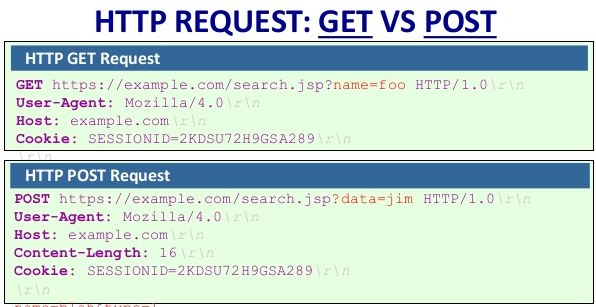
Image Source:
https://www.tutorialexample.com/a-simple-way-to-get-file-extension-in-php-php-tutorial/
GET
/test/demo_form.php?name1=value1&name2=value2
Notes
GET requests can be cached
GET requests remain in the browser history
GET requests can be bookmarked
GET requests should never be used when dealing with sensitive data
GET requests have length restrictions
GET requests are only used to request data (not modify)
- The GET method is used to retrieve information from the given server using a given URI. Requests using GET should only retrieve data and should have no other effect on the data.
POST
POST /test/demo_form.php HTTP/1.1
Host: w3schools.com
name1=value1&name2=value2
Notes
POST requests are never cached
POST requests do not remain in the browser history
POST requests cannot be bookmarked
POST requests have no restrictions on data length
- A POST request is used to send data to the server, for example, customer information, file upload, etc. using HTML forms.
HTTP Methods
- GET
- POST
- PUT
- HEAD
- DELETE
- PATCH
- OPTIONS
The two most common HTTP methods are: GET and POST.
SOURCES:
https://www.w3schools.com/tags/ref_httpmethods.asp
https://www.tutorialspoint.com/http/http_requests.htm
Friday, May 22, 2020


Wednesday, May 20, 2020
aligning in a flex container
https://developer.mozilla.org/en-US/docs/Web/CSS/CSS_Flexible_Box_Layout/Aligning_Items_in_a_Flex_Container
CSS is generic by default
- CSS is generic by default, meaning that all css will be applied to all elements unless you give your divs a class
Fundamentals: Properties Window
- the properties window tells you what code is not working
- essential for figuring out why a string of code is not working in Dreamweaver

div ID = menu - drop-down menu
<div id="menu">
<ul>
<li> <a href='#'>Home</a></li>
<li> <a href='#'>Link1</a></li>
<li> <a href='#'>Link2</a></li>
<li> <a href='#'>Link3</a></li>
Fundamentals: No Spaces in between bracket and letter of word
- I keep making the mistake of putting a space between bracket and letter of word
- <h1>pineapple</h2>
<h1> pineapple</h2>
- the space cannot be there
right way:
<h1>pineapple</h2>
Wednesday, May 13, 2020
< iframe> - HTML Code
- <iframe> tag is used for video
Example of the <iframe> HTML tag being used to create a YouTube video:
Tuesday, May 12, 2020
Search Engine - HTML Code
<input id="search" autocapitalize="none" autocomplete="off" autocorrect="off" name="search_query" tabindex="0" type="text" spellcheck="false" placeholder="Search" aria-label="Search"></div>
Subscribe to:
Posts (Atom)